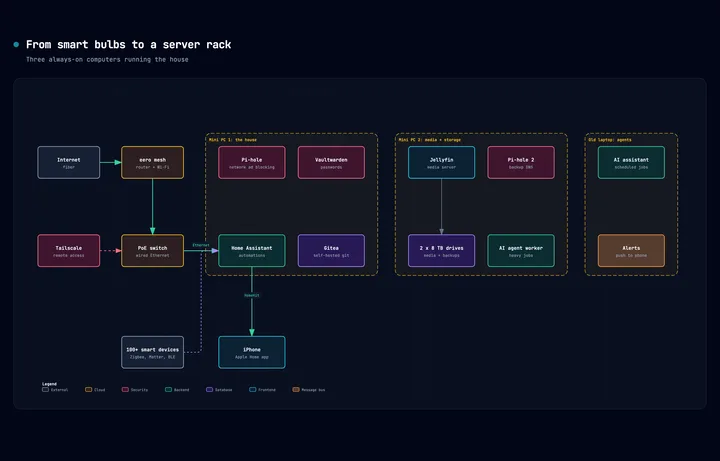
People ask what a homelab is, and the honest answer is that it's whatever happens after you buy one smart bulb and keep going. Mine grew one small decision at a time over many years, and looking back, each step followed from the limits of the one before it. This post walks through that path using my own setup as the case study, in the order it actually happened.
Stage one: smart lights and a cheap speaker
For a lot of people the start is home automation, and that was true for me. Many years ago I wanted Hue lights so I could have smart lighting with fun colors, and an Amazon Echo was cheap enough that adding voice control hands free felt like an easy win.
From there the collection grows quietly. I added more lights, then more Echos around the apartment, then smart locks for the doors, then a security system with sensors on the windows, and then a handful of smart plugs so I could control whatever happened to be plugged into them.
That's when the first real problem shows up. Every one of those devices comes with its own app, its own login, and its own idea of how things should work. The Alexa app can pull a lot of it together, and for a while I used it as the bridge for as much as it could manage, but its interface is clunky and there's only so much you can do from it.
Stage two: Homebridge and the first always-on computer
The next thing you hear about is Homebridge. It's software that runs on a Raspberry Pi or any small computer that stays on all the time, and it takes devices from all those separate vendor apps and brings them into Apple's Home app.
The Home app is genuinely nice, especially if you're on an iPhone, and it syncs across all your Apple devices. Its weakness is that relatively few smart devices pair with it natively, and Homebridge fills exactly that gap.
Having everything in one place also unlocks automations that cross vendors. Before, a Hue light and an Alexa smart plug lived in two different apps and had no way to talk to each other. With both in the Home app, a Hue light turning on can trigger the smart plug, and you can start building more complex automations from there.
The bigger change is quieter, though. Once you have a small computer running around the clock for Homebridge, you can run other software on it too. For me that was Pi-hole, which blocks ads for the whole network. A browser extension only protects the one browser it's installed in, while Pi-hole blocks ads for every device connected to your network, and that's where the name comes from.
Stage three: Home Assistant on a mini PC
Eventually Homebridge runs out of road. Some devices still won't come into the Home app, and the automations you want get more complex than it handles well.
The next step up is Home Assistant, an open source home automation platform. It can also connect to the Apple Home app, so Home Assistant becomes the central hub for every device and automation, and you choose which devices to pass through to the Home app. That split works well in our house. My wife can open the Home app on her iPhone and do the simple things like locking doors and turning lights on and off, while everything complicated lives in Home Assistant.
Home Assistant integrates with an enormous range of things. In our house it talks to the solar panels on the roof, a lot of smart plugs doing energy monitoring, cameras and the security system, a robot vacuum, and smart cat feeders, which adds up to over 100 devices. I also do presence detection over Bluetooth, which is a story on its own, because our two cats make traditional motion and presence sensors unreliable. You can get creative too. Cheap microcontroller boards like the ESP32 let you build your own sensors, and even something as small as a vibration sensor in the mailbox can send a notification to your phone when the mail arrives.
Home Assistant needs more compute than a Raspberry Pi comfortably gives it. There are dedicated devices sold for running it, which are small computers underneath, and a popular alternative is buying a small form factor desktop or a mini PC. You plug in a keyboard, mouse and monitor once to set it up, and after that you manage it remotely. What matters is that it stays on. That was my next step, with a mini PC running Home Assistant and Pi-hole.
Stage four: self-hosting your subscriptions
Once you have a capable always-on machine, you start learning about self-hosted software, and there is a lot of free software out there that can replace things you pay for every month.
Immich handles photo storage and can stand in for Google Photos or iCloud. Jellyfin or Plex run a media server, so if you have a big collection of DVDs you can digitize them and stream them from anywhere, and share that library with friends and family. Bitwarden stores passwords and other sensitive credentials, and Vaultwarden is a lightweight server for it that you can host yourself, which is what I run. That list keeps going for a long time.
Stage five: the lab part of homelab
If you like to tinker, or you're a software engineer like me, this is where the "lab" part kicks in. You might host your own web apps or websites, or learn networking. You might be building skills for your job as a software engineer, security engineer or IT professional, and a homelab is a safe place to build, deploy and manage containers, Kubernetes and the rest without breaking anything that matters at work.
In the AI era there's a newer reason too. With an always-on computer you can run an AI assistant that's always available, one you can message from anywhere and have it do things for you.
Stage six: running out of compute
All of this adds up, and eventually you run low on something. Maybe it's RAM, maybe storage, maybe CPU, or maybe you start seeing thermal spikes. The answer at this stage is usually more hardware, so you buy another mini PC or two and spread your services across them.
Stage seven: high availability
Then a different question shows up, which is how much you now depend on all of this. If the homelab goes down, can you still get into your house? Can you still reach your important data and your backups?
Once the answer starts to worry you, high availability matters. A common approach is to build a cluster of computers so there's redundancy built in. Each computer in the cluster is a node, and if any node goes down, another one can take over its work, so the system as a whole stays available.
At this point you basically have a small server rack, and you might organize your gear into an actual rack. You'll have networking gear too, starting with an Ethernet switch, which is a box full of Ethernet ports. Your internet connection plugs into the switch, and all your devices plug into it as well, so everything is on your wired network instead of depending on Wi-Fi. That's roughly where I am today.
Stage eight: privacy and reliability
The stage I'm in now is about privacy and reliability. Even with everything managed in one place through Home Assistant, a lot of my devices still connect to their own vendor's cloud and send data back to the company that made them.
The robot vacuum is a good example, and it's the project I'm working on right now. Modern robot vacuums use LIDAR to map your home, and that map goes up to the manufacturer's servers, which means a company holds a detailed floor plan of your house. A video doorbell company might know who comes to your home and when.
So the next step is moving devices off the cloud and onto my local network only. Privacy is one benefit, and reliability is the other. If my internet goes out, or the vendor's service has an outage, nothing in my house changes, because as long as my own network is up, everything keeps working. I'm doing that by moving Wi-Fi devices over to local protocols like Zigbee, Thread with Matter, Bluetooth, and my own wired Ethernet network.
How it adds up
That's the rundown of how this hobby gets out of hand, and why someone might end up building a homelab without ever deciding to. Mine happened organically, one limitation at a time.