A year ago, my smart home was a mess. Ring app for the alarm, Hue app for lights, Aqara app for the lock, SwitchBot app for curtains. Five different apps to control one house. My wife wasn't going to juggle all of that, so the "smart home" was mostly just me yelling at Alexa.
I got a Raspberry Pi for Christmas and set up Homebridge on it. That was the first real upgrade. All the devices showed up in Apple Home, my wife had one app, Siri worked. Good enough for a while.
But I wanted more. Actual automations, not just voice commands. Lock the doors when the alarm is armed. Turn off the lights when nobody's home. Adjust the thermostat based on whether we're awake or away. Homebridge couldn't do that. I needed Home Assistant.
Six months ago, I bought a Beelink Mini PC, installed Proxmox, and set up Home Assistant and Pi-hole in Docker containers. I wrote about that experience in a previous post. The key insight from that project was using Claude Code to build automations via SSH and the HA API instead of manually editing YAML. It worked well, but there was still friction. Claude could write the automations, but I was doing a lot of the infrastructure setup manually through web UIs, clicking through configuration wizards, copy-pasting settings between browser tabs.
This weekend, that changed.
The Approach
Same as any software project. Research, spec, plan, implement.
I had Claude research the current state of self-hosting tools, specifically telling it to search for what's available now rather than relying on training data. That matters in this ecosystem because things change fast. Mullvad dropped port forwarding in 2023, FlareSolverr stopped working and Solvearr replaced it, Readarr got retired entirely. Using stale knowledge would have sent me down dead ends.
Claude wrote a design spec covering architecture, container relationships, storage layout, VPN configuration, and a migration plan for when I eventually get a NAS. Then it reviewed its own spec, found issues (wrong port numbers, missing volume mounts, a misleading data flow diagram), fixed them, and reviewed again until there was nothing left to fix. Then I reviewed it.
Same cycle for the implementation plan. Step-by-step, exact commands, expected outputs.
The big shift from six months ago wasn't just Claude getting smarter, it was how I used it. I stopped treating it like a code assistant and started treating it like a junior engineer who can SSH into my server. Every time it said "open the web UI and configure X," I pushed back and asked if it could do it via the API instead. More often than not, it could. Radarr, Sonarr, Prowlarr, Uptime Kuma, Nginx Proxy Manager, Pi-hole. They all have APIs. Claude pulled API keys from config files, scripted configurations, linked services together, and set up monitoring without me opening a browser.
The few things that genuinely required a UI were first-run setup wizards. Even then, Claude told me exactly what to type in each field, including API keys and internal Docker hostnames. I was basically a human clipboard.
Then it executed. SSH into Proxmox, create the LXC container, install Docker, deploy the stack. When things broke, and they did break, it diagnosed and fixed them. Docker 29 can't write certain kernel sysctls inside unprivileged LXC containers. IPv6 causes Docker image pulls to timeout in LXC environments. Gluetun's health check port and method differ from the documentation. Each of these would have been a frustrating hour of Googling. Claude hit the error, tried approaches, and landed on solutions.
Once the core media stack was running, adding more services was fast. Each followed the same pattern: add to Docker Compose, create config directory, deploy, add reverse proxy entry, add monitoring check. Claude scripted the whole loop. Most services went from "let's add this" to running in under five minutes.
What I Built This Weekend
It started with replacing streaming subscriptions. Netflix, Hulu, HBO Max, about $45 a month. I ended up building a lot more than a media server.
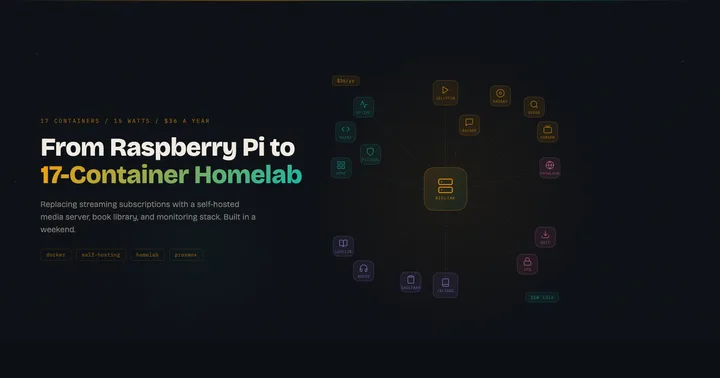
The media stack is the core. Jellyfin replaces Netflix, Jellyseerr gives everyone a clean UI to request movies and shows, and Sonarr and Radarr handle the actual searching and downloading. Prowlarr manages torrent indexers so Sonarr and Radarr don't have to. Bazarr pulls subtitles automatically. The whole pipeline is fully automated: request something on Jellyseerr, it gets searched, downloaded, imported, and shows up ready to stream on the Apple TV. No manual steps.
All torrent traffic routes through ProtonVPN via Gluetun, which acts as a VPN container that qBittorrent connects through. Only download traffic hits the VPN. Everything else on the server goes out normally. Split tunneling without touching the host network config, which is one of those things that sounds complicated but Docker makes surprisingly clean.
Then scope crept in the good way. Calibre-web for my ebook library (my Viwoods e-reader pulls books over OPDS), Audiobookshelf for audiobooks and podcasts with an iOS app that syncs progress across devices, LazyLibrarian for automated ebook downloads, and Shelfarr as a request system for books, like Jellyseerr but for the reading stack.
The infrastructure layer is what makes it all feel like a real system instead of a pile of containers. Homepage gives me a single dashboard with every service, its live status, and download progress. Nginx Proxy Manager means I type jellyfin.home.local instead of trying to remember that Jellyfin is on port 8096 and Jellyseerr is on 5055. I added one wildcard DNS entry in Pi-hole and now any new service gets a clean URL automatically. And Uptime Kuma checks every service every 60 seconds, so I know something's down before anyone tries to use it. Claude added all 17 monitors via the Python API in one script.
That's 17 containers running on a $200 mini PC that draws 15 watts.
What Didn't Work
Not everything went smoothly. I tried setting up Frigate NVR with my Ring battery cameras and it drained them in hours. Turns out battery-powered cameras aren't designed for continuous RTSP streams. That one's on me for not thinking it through. Wired cameras are on the list now.
Gluetun was the most frustrating part of the whole build. The documentation says one thing about health checks, the actual behavior is different, and the error messages don't help. Claude went through three different configurations before landing on one that worked reliably. Without the ability to rapidly iterate, test, read logs, and try again, I probably would have given up and just run the VPN on the host.
What It Costs
| What | Cost |
|---|---|
| Hardware (Beelink Mini PC) | Already owned |
| ProtonVPN Plus (2-year plan) | $3/month |
| 8TB external hard drive | ~$150 one-time |
Total ongoing cost: $36/year. Versus $540/year in streaming subscriptions alone. That's before canceling the Audible subscription now that Audiobookshelf is running, or downgrading iCloud storage once Immich is set up for photo backup.
What's Next
The foundation is in place. Adding new services is trivial now. On the list:
- Immich for photo backup, replacing iCloud storage
- Grafana + Prometheus for monitoring dashboards
- Actual Budget for envelope budgeting, replacing paid budgeting apps
- Wallabag for read-later articles
- Wired cameras for Frigate NVR (lesson learned)
The Beelink has headroom. 17 containers, 16GB RAM, using about 75% of an 80GB disk. The N100 processor barely breaks a sweat. When storage becomes the bottleneck, the 8TB drive handles it, and eventually a proper NAS takes over.
What Surprised Me
A year into this, the thing I didn't expect is how much the infrastructure matters more than any individual service. Jellyfin is great, but Jellyfin without Homepage, Nginx Proxy Manager, and Uptime Kuma is just another thing running on a weird port that I'll forget about in a month. The monitoring, the clean URLs, the dashboard. That's what makes it a system instead of a hobby project.
The other thing I didn't expect is how fast the loop gets. The first few containers took real effort because we were setting up Docker, networking, reverse proxy rules, and monitoring from scratch. By container 12, it was five minutes from "let's add this" to "it's running and monitored." That compounding effect is the real argument for self-hosting. The marginal cost of each new service approaches zero once the foundation exists.