Home automation is a lot of fun, but once it becomes a serious hobby, you start running into some challenging problems.
Device fragmentation, for one. Ring app for the alarm. Hue app for lights. Aqara app for the lock. SwitchBot app for curtains. My wife's not going to download a dozen apps on her phone to control the house.
Then there's automation complexity. Most smart home platforms make simple things easy and complex things impossible. "Turn on lights at sunset" is fine. "Turn on lights at sunset, but only if someone's home, unless the alarm is armed, and also dim them if the TV is on" requires either a PhD in YAML or a tangled mess of node-red flows.
So here's my setup for 2026. I'll run through the hardware and services, but the part I really want to focus on is this: not editing YAML files by hand, not clicking through the Home Assistant UI, but building a strong connection between Claude Code and Home Assistant so I can use natural language to build out my automations.
The Stack
Hardware
- Beelink Mini PC (~$200) - Low power, always-on server [1]
- Proxmox - Free virtualization layer [2]
- Docker - Container runtime inside LXC containers [3]
Services
Everything runs in Docker containers:
- Home Assistant - Central hub for all devices
- Pi-hole - Network-wide ad blocking
This is expandable. Jellyfin for media, Frigate for NVR, whatever you need.
The Key Part: Claude Code + Home Assistant
Here's where it gets interesting. Claude Code is Anthropic's CLI tool that gives Claude direct access to your filesystem and terminal. Point it at your home automation documentation, and it becomes an intelligent assistant that knows your setup.
Documentation Folder
Keep a local folder with markdown files that document your setup. This is the key to making Claude Code useful. Include:
- Architecture notes - How your system is set up, what containers run where, common commands
- Project logs - What you've built, what broke, how you fixed it
- Config copies - Local copies of your configuration.yaml for reference
This folder is context. When Claude Code reads these files, it stops being a generic assistant and becomes one that knows your specific setup.
Connection Method
Claude Code connects to Home Assistant through three methods, each serving a different purpose:
| Method | What it's for |
|---|---|
| SSH | File operations, container management |
| REST API | State queries, service calls |
| WebSocket | Registry operations |
In practice, SSH is the workhorse. Most of what we do is edit YAML, upload it, restart or reload. REST API is for quick checks and triggering actions. WebSocket is niche, only needed for certain registry operations like renaming entities.
Setup:
- SSH config entry pointing to your Home Assistant server with key-based auth
- Long-lived access token created in Home Assistant UI (Profile → Long-lived access tokens)
- Token stored in an environment variable (
HASS_TOKEN) so Claude Code can use it
How do you set this up? Ask Claude Code to do it. It can generate SSH keys, update your SSH config, and set up the environment variables.
Bonus: Pair this with an AI voice-to-text tool [4] and you can just talk to Claude Code. Describe what you want out loud, it types for you, Claude Code does the rest.
The Payoff
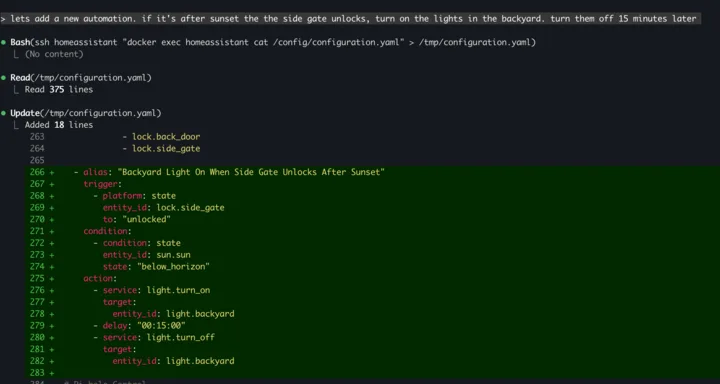
Instead of clicking through GUIs or memorizing YAML syntax, you describe what you want:
"Create an automation that dims the kitchen lights when the Apple TV starts playing after sunset"
Claude Code:
- Reads your configuration to understand existing entities
- Writes the YAML automation
- Uploads it to the server
- Validates the config
- Reloads Home Assistant
When something breaks, you describe the problem:
"The Ring sensors show unavailable"
Claude Code investigates, finds that the ring-mqtt container stopped, restarts it, re-authenticates if needed, and documents the fix.
Real Examples
Apple Home as unified interface. Home Assistant exposes a HomeKit bridge. All devices, regardless of manufacturer, appear in Apple Home with Siri support. Claude Code configured the bridge, filtered which entities to expose, and set friendly names.
Conditional Ring alarm automation. "Lock all doors when the alarm is armed" sounds simple. Implementation requires knowing the entity IDs, the correct service calls, and handling both armed_home and armed_away states. Claude Code wrote it in seconds:
- alias: "Lock All Doors When Alarm Armed"
  trigger:
    - platform: state
      entity_id: alarm_control_panel.oakland_alarm
      to: "armed_home"
    - platform: state
      entity_id: alarm_control_panel.oakland_alarm
      to: "armed_away"
  action:
    - service: lock.lock
      target:
        entity_id:
          - lock.aqara_smart_lock_u100
          - lock.back_door
          - lock.side_gate
What This Changes
The old workflow: SSH into the container, open a YAML file in Nano, make your edits, save, reload. If your spacing is off, it breaks. Fix it, try again. None of this is hard, it's just time-consuming. When building an automation takes 20 minutes of fiddling, it's harder to justify the time.
Claude Code compresses that. I describe what I want, it writes the YAML, uploads it, validates the config, reloads the integration. The documentation folder gives it context about my specific setup, so it knows my entity names, my server IPs, how my containers are organized. That's the difference.
That's the stack for 2026.
[1] The hardware doesn't matter much. An old laptop, a Raspberry Pi, or any always-on computer will work. I went with a mini PC for the performance headroom, but Home Assistant runs fine on minimal hardware.
[2] Proxmox lets you run multiple isolated environments on one machine. I can run Home Assistant in one container, Pi-hole in another, and spin up test environments without affecting production. If something breaks, I can snapshot and restore. Overkill for some, but nice to have.
[3] Why containers instead of bare metal? I can run multiple services on the same hardware without them stepping on each other. Home Assistant, Pi-hole, a media server, whatever. Each runs in its own container with its own dependencies. Updates are clean, backups are simple, and if a container misbehaves, you restart it without touching anything else.
[4] Voice-to-text options: Wispr Flow and VoiceInk both work well. They transcribe in real-time as you speak, so you can dictate directly into the terminal.