I recently rebuilt my portfolio site from scratch. No React. No Next.js. No build step. Just HTML, CSS, and a few scripts.
It loads in under 200ms. There's nothing to hydrate, no bundle to download, no client-side rendering. It's the simplest thing I could have built.
But here's the thing: it updates itself.

The problem with portfolio sites
Every developer has built a portfolio site and then abandoned it. The blog section still shows posts from 2022. The "recent projects" haven't been updated since you launched. It was supposed to represent who you are, but it represents who you were.
The reason is obvious. Updating a static site means opening the HTML, editing content by hand, and pushing to GitHub. It takes ten minutes. You'll never do it.
The site I replaced had exactly this problem. I'd publish a blog post on Hashnode and forget to update my portfolio. I'd merge a PR into a major open source project and my site had no idea. The portfolio was a snapshot, not a reflection.
So when I rebuilt it, I decided the site itself could stay simple. The engineering would go into keeping it alive.
What stays fresh automatically
My site tracks four things without me touching it:
Blog posts pulled from Hashnode's GraphQL API
OSS contribution stats: total PRs merged, repos contributed to, languages used (GitHub API)
Recently merged PRs with repo name, star count, and language
Notable repos ranked by a composite score of project size and contribution depth
None of this is hardcoded. If I merge a PR into a new repo tomorrow morning, it shows up on my site by tomorrow afternoon.
The architecture
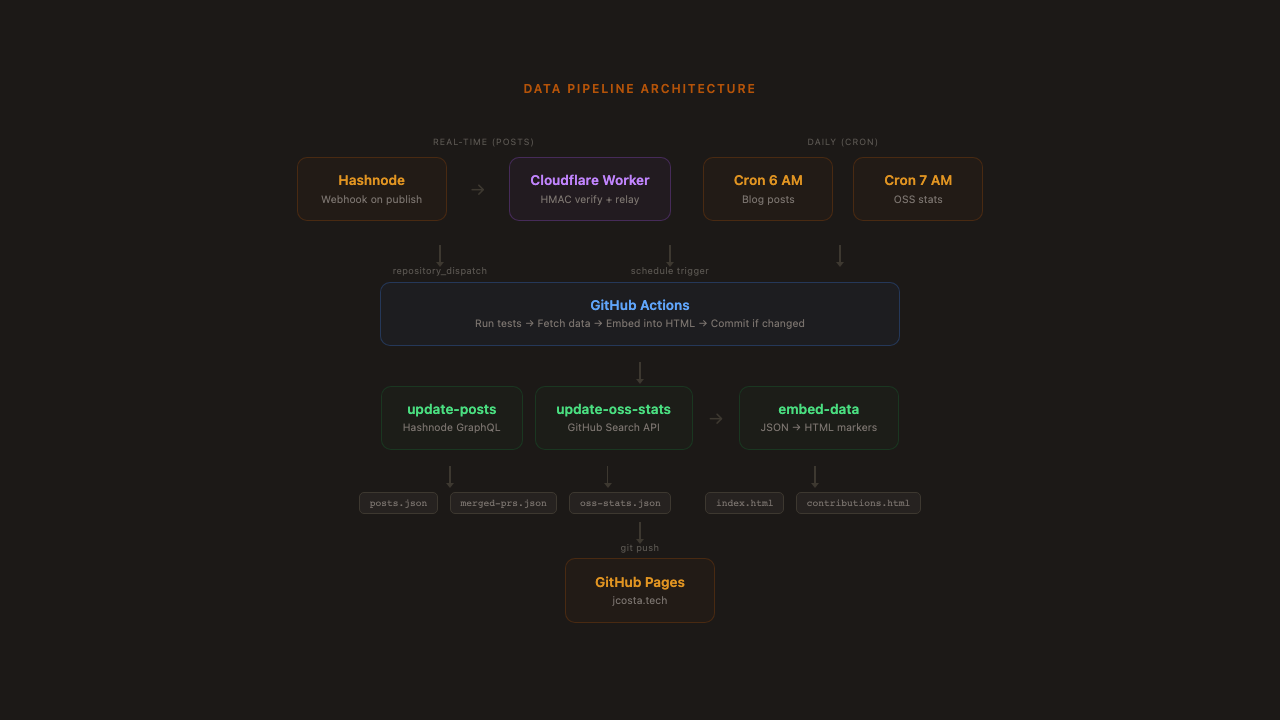
The system has three layers: data fetching, HTML injection, and triggers.
Layer 1: Data fetching
Two Node.js scripts pull data from external APIs and write JSON files. One hits Hashnode's GraphQL API for blog posts. The other uses GitHub's search API to find all my merged PRs across public repos.
The OSS stats script is incremental. It maintains a full list of merged PRs in data/merged-prs.json and only fetches PRs newer than the most recent one on file. This matters because GitHub's search API caps results at 1000. If you have more than that and try to fetch them all at once, you'll silently lose data. The incremental approach sidesteps this entirely: each run only needs to fetch what's new since yesterday.
For each new PR, the script fetches repo metadata (star count, primary language), filters out repos below 50 stars, handles rate limiting by checking X-RateLimit-Remaining and backing off when it gets low, and caches repo metadata to avoid redundant API calls.
From the merged PR list, a deriveOssStats() function builds everything the frontend needs: total counts, per-repo breakdowns, language distribution, and a ranked "notable repos" list. The ranking was an interesting problem.
I didn't want it to be pure star count (that would just show whichever massive repo I happened to send one PR to). I also didn't want pure PR count (that would over-index on small repos I had a drive-by fix for). The composite score:
score = stars * sqrt(prCount)sqrt dampens the PR count so that quantity matters, but with diminishing returns. In practice this means ink (35.6k stars, 15 PRs, score ~137k) ranks above Homebrew (47k stars, 2 PRs, score ~66k). Depth of contribution wins over drive-by fame.
Layer 2: Marker-based HTML injection
The site is plain HTML. There's no templating engine, no static site generator, no build step. So how does data get into the page?
Comment markers. An embed script reads each JSON data file, generates HTML snippets, and replaces everything between matching <!-- BEGIN:X --> and <!-- END:X --> comment pairs. The core is a single regex replacement function:
function replaceBetweenMarkers(html, beginMarker, endMarker, newContent) {
  const pattern = new RegExp(
    `(${escaped(beginMarker)})([\\s\\S]*?)( *${escaped(endMarker)})`, 'g'
  );
  return html.replace(pattern, `$1\n${newContent}\n$3`);
}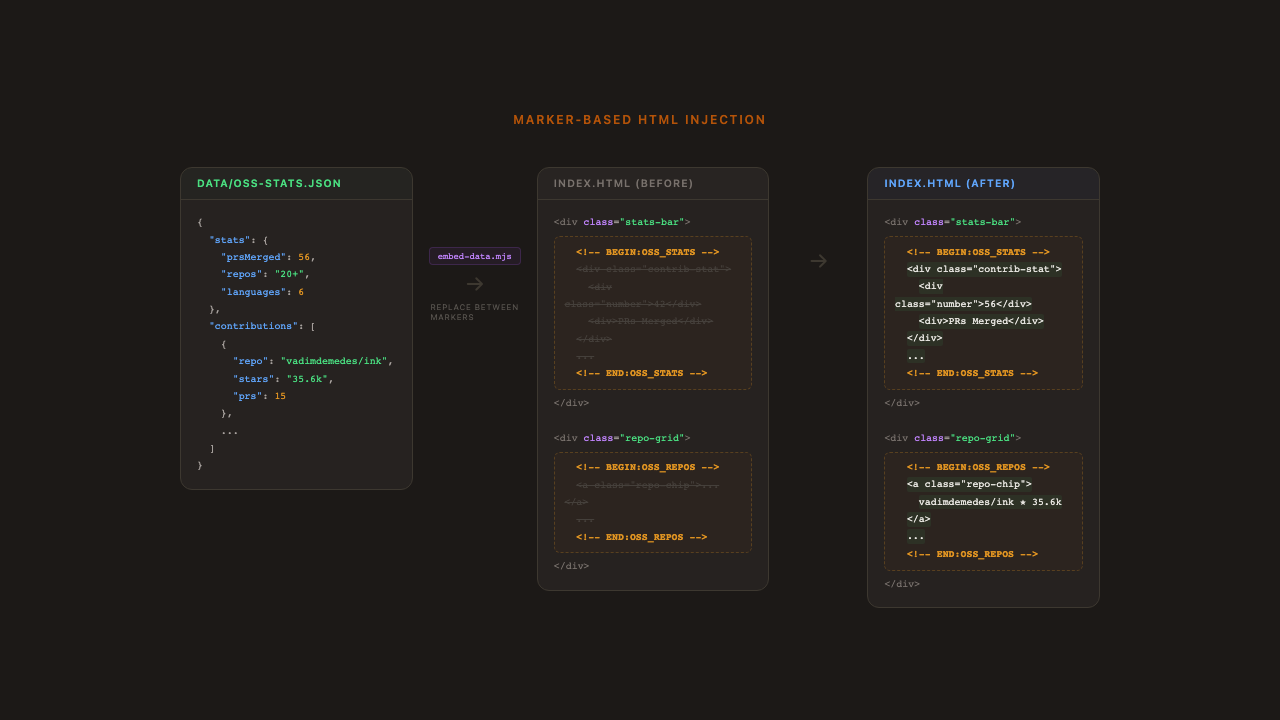
The regex captures the begin marker, everything between, and the end marker. The replacement keeps both markers in place and swaps the middle. This makes it idempotent: you can run it repeatedly and it produces the same result. You can also view source on the live site and see exactly where the dynamic content lives.
I use six marker pairs across two HTML files: four in index.html (stats, repos, recent PRs, blog posts) and two in contributions.html (stats summary, full PR list). Adding a new dynamic section means adding a marker pair and a generate function. That's it.
Since the pipeline fetches from external APIs I don't control, every field gets run through escapeHtml() before interpolation. If someone names their repo <script>alert(1)</script>, it renders as text.
Layer 3: Triggers (and why there are two)
When I publish a blog post on Hashnode, I want it on my portfolio immediately. Hashnode supports webhooks. So the primary path is real-time: I publish, Hashnode fires a webhook, my site updates within 30 seconds.
But I've been building production systems long enough to know that you can't trust third parties. Webhooks fail silently. Hashnode might change their webhook format. Cloudflare might have an outage. The GitHub API might rate-limit the dispatch. Any link in a three-service chain can break, and you won't know until someone visits your site and sees stale data.
So the webhook is the fast path, and a daily cron job is the safety net. If the webhook fires, great, the site updates in seconds. If it doesn't, the cron job catches it within 24 hours. The same update workflow runs either way, and it's idempotent, so it doesn't matter if both fire on the same day. The cron doesn't check whether the webhook already ran. It just fetches the latest data and embeds it. If nothing changed, no commit is created.
This is the same pattern you'd use in any distributed system: optimistic real-time updates with a periodic reconciliation loop as a backstop.
The webhook relay
GitHub Actions can't receive arbitrary webhooks directly. You need something in the middle. I used a Cloudflare Worker as a relay: it receives the Hashnode webhook, validates the HMAC signature using crypto.subtle.verify() for timing-safe comparison, and dispatches a repository_dispatch event to GitHub. The whole worker is about 40 lines. It validates the signature format before touching crypto, and error responses don't leak any details about the downstream GitHub integration.
Deploy is a single command (npx wrangler deploy), secrets are set in the Cloudflare dashboard.
The cron fallback
The GitHub Actions workflow accepts all three triggers in one file:
on:
  schedule:
    - cron: '0 6 * * *'    # Daily at 6 AM UTC
  workflow_dispatch:         # Manual trigger for debugging
  repository_dispatch:
    types: [hashnode-post-published]  # Webhook path
The job runs the same steps regardless of which trigger fired: run tests, fetch data, embed into HTML, commit if changed. The conditional commit (git diff --staged --quiet) is what makes the dual-trigger approach safe. If the webhook already ran and embedded the same data, the cron creates no commit. No harm, no noise.
The OSS stats workflow is similar but only has cron and manual triggers. There's no webhook equivalent for "you merged a PR on GitHub," so the daily cron is the only automated path there.
Testing
The pipeline generates HTML that gets served to real users, so I test it the same way I'd test production code.
The test suite has 27 tests across four layers: pure function correctness (escaping, date formatting, star display), marker replacement logic, structural integrity (verifying that every expected marker pair exists in the HTML files), and data schema validation (confirming the JSON files have the fields the embed script expects).
The structural tests are the most valuable. If someone accidentally deletes a marker comment while editing the HTML, the test suite catches it before the embed script silently skips that section. Both GitHub Actions workflows run the full test suite before fetching or embedding any data. If tests fail, the pipeline stops before touching anything.
Why not a framework?
I seriously considered Next.js or Astro. Both would have made the data integration more conventional. But I kept coming back to the same question: what does the framework actually give me here?
My site has no client-side interactivity beyond a hamburger menu. There's no routing (it's two pages). There's no state management. The "dynamic" parts update once a day, not on every page load.
A framework would add a build step, a node_modules folder, version upgrades to maintain, and a hosting dependency beyond static file serving. For a site that's fundamentally static content with periodic data refreshes, that's overhead in exchange for convenience I don't need.
The pipeline approach keeps the runtime dead simple (it's just files served by GitHub Pages) and moves the complexity into CI, where I have full Node.js, can test properly, and failures don't affect what's already deployed. If a cron job fails, the site still serves yesterday's data. If a Next.js build fails, you might have no site at all.
What I'd do differently
Start with the data pipeline, not the design. I designed the site first and retrofitted the automation. It would have been cleaner to define the data shapes first and design the HTML around them. I ended up refactoring the marker positions multiple times as the data model evolved.
The marker approach has limits. It works well for discrete sections, but if you needed the same data woven into multiple places (like a sidebar, a footer stat, and a header badge all showing the same PR count), you'd want a real templating engine. For my use case, each section is self-contained, so markers are the right tool.
Seed your data first. The incremental update script assumes existing data exists. I wrote a separate seed-merged-prs.mjs that does a one-time full fetch to bootstrap the dataset. If you're adapting this pattern, plan for that bootstrapping step. Don't try to make your daily update script also handle the initial load.
How to build your own
If you want to try this approach, here's the pattern:
A
data/directory with one JSON file per data source. This is your single source of truth.Fetch scripts (one per data source) that pull from APIs and write JSON. Make them incremental if you're near any API limits.
An embed script with the
replaceBetweenMarkerspattern. Every external string goes throughescapeHtml().Comment markers in your HTML wherever you want dynamic content.
GitHub Actions with cron triggers. Run tests first. Only commit if something changed.
Tests that validate your pure functions, data schemas, and marker integrity.
A webhook relay if any of your data sources support webhooks, with a cron fallback because webhooks aren't reliable.
The whole thing is open source. Fork it, rip out my content, keep the pipeline.
The site is at jcosta.tech. It looks like a simple static page. Under the hood, it's quietly keeping itself current. That's the whole point. The best infrastructure is the kind nobody notices.